
Overview
If you encounter the following error when trying to book an international order with DHL in Shiptheory:
Unable to create label
Error in parsing request XML:
cvc-complex-type. 2.4.a: Invalid content was found starting with element 'CommodityCode'
This error typically occurs during international shipments and relates to customs data validation.
Although the message references the Commodity Code, the underlying issue is usually missing or zero-weight/value data, not the commodity code itself.
Why This Happens
International carriers require complete and valid customs data before generating a shipping label. This includes:
- Commodity Code (HS Code)
- Product Description
- Country of Origin
- Weight
- Value
Even if the Commodity Code is correctly entered, DHL will reject the request if any required data is missing or invalid.
Common Causes
When required fields are incomplete, XML validation fails, and the system may incorrectly flag the Commodity Code as the problem.
Step-by-Step Fix
Follow the steps below to resolve the issue:
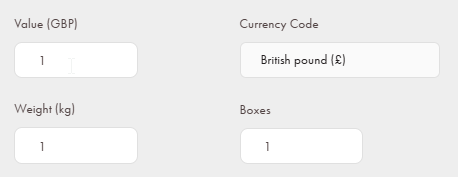
Step 1: Check the order value and weight
Ensure that every product in the order has a valid weight.
- Confirm the order details have a value and weight greater than 0
Step 2: Check the product shipments
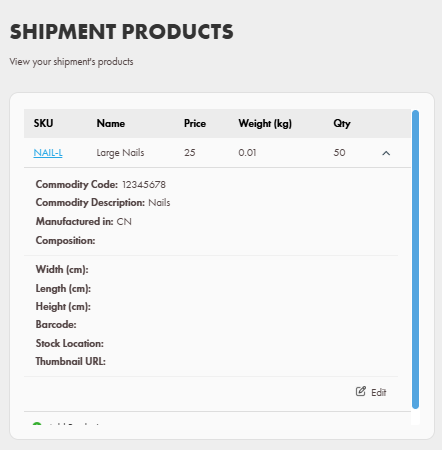
Check and make sure the product shipments have the required information.
- Ensure each product has a value.
- Confirm the value is greater than zero.
- When checked, save the product
Final Check
After correcting any missing information:
- Re-sync the order (if needed)
- Retry the shipment booking in Shiptheory.
- Confirm that the label generates successfully.
In most cases, ensuring weight and value fields are correctly populated will resolve the error.
If you encounter any issues, please feel free to contact our support team. You can call us on 0117 403 4313 (UK) / +1 (629) 666-6726 (US) or reach us online here.