
As of Shiptheory SuiteApp version 1.4.0 there are 3 ways you can manually trigger an Item Fulfillment to be sent to Shiptheory's queue outside.
TABLE OF CONTENTS
Send to Shiptheory button
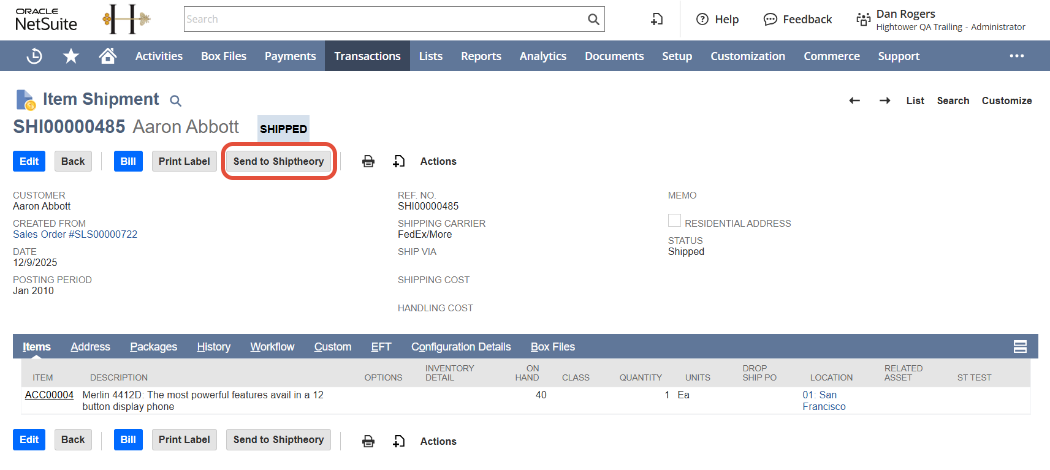
When viewing an Item Fulfillment you will see a button at the top and bottom of the page labelled "Send to Shiptheory". Pressing this will cause the Item Fulfillment to be pushed to Shiptheory's queue for download. On success the fulfilment is marked as sent to Shiptheory to prevent subsequent updates from pushing the Item Fulfillment to the queue again.
Via RESTlet
Shiptheory's core enqueuing logic is exposed for your use via a custom RESTlet as part of the Shiptheory SuiteApp.
The RESTlet request schema
The RESTlet expects a JSON payload to be provided to it via a POST request. In addition to this, both the Content-Type and Accept headers should be set to "application/json".
| Field | Type | Required? | Details |
|---|---|---|---|
| fulfillment_id | Unsigned Integer | Required | The NetSuite internal id of the Item Fulfillment you wish to send to Shiptheory |
| perform_updates | Boolean | Optional | Defaults to true. Choose whether the "sent_to_shiptheory" field should be updated on the Item Fulfillment if the push to the queue is successful. If set to true then a save will be performed on the Item Fulfillment which will trigger user event scripts. |
Invoke RESTlet via HTTP
You can invoke the RESTlet via a standard HTTP request. For details on how to invoke a RESTlet in this manner see NetSuite's documentation on RESTlets. Here's an example expressed as a standard HTTP request:
POST /app/site/hosting/restlet.nl?script=2063&deploy=1 HTTP/1.1
Host: {YOUR_NETSUITE_ACCOUNT_ID}.restlets.api.netsuite.com
Accept: application/json
Content-Type: application/json
Authorization: ••••••
Content-Length: 63

{
    "fulfillment_id": 12345,
    "perform_updates": true
}
Invoke RESTlet via SuiteScript
You can also invoke the RESTlet directly from your own SuiteScripts. Below are 2 examples. 1 for a UserEvent script and one for a Client script.
| Record Type | Record ID |
|---|---|
| Script ID | customscript_shiptheory_enqueue |
| Deployment ID | customdeploy_shiptheory_enqueue |
UserEvent script example
/**
 * @NApiVersion 2.1
 * @NScriptType UserEventScript
 */
define (['N/https', 'N/log'] , (https, log) => {
    /**
     * @param {Object} context
     */
    const afterSubmit = (context) => {
        if(![context.UserEventType.CREATE, context.UserEventType.EDIT].includes(context.type)) {
            return;
        }

        // If you wish to skip this gaurd then do no call from user event on the Item Fulfillment. NetSuite
        // will infinitely recurse as the RESTlet updates the given IF, therefore
        // triggering the user event script again.
        const sent_to_shiptheory = context.newRecord.getValue({fieldId: 'custbody_sent_to_shiptheory'});
        if (sent_to_shiptheory) {
            log.debug('Already sent to ST');
            return;
        }

        const res = https.requestRestlet({
            method: 'POST',
            scriptId: 'customscript_shiptheory_enqueue',
            deploymentId: 'customdeploy_shiptheory_enqueue',
            headers: {
                'Content-Type': 'application/json',
                'Accept': 'application/json',
            },
            body: JSON.stringify({
                fulfillment_id: context.newRecord.id,
                perform_updates: true,
            }),
        });

        log.debug("Restlet Response", res);
    }

    return {afterSubmit}
});
Client script example
/**
 * @NApiVersion 2.1
 * @NScriptType ClientScript
 */
define(['N/url', 'N/https'],
    (url, https) => {
        /**
         * Page initialisation
         *
         * @param {*} context
         */
        const pageInit = (context) => {
            https.post.promise({
                url: url.resolveScript({
                    scriptId: 'customscript_shiptheory_enqueue',
                    deploymentId: 'customdeploy_shiptheory_enqueue',
                }),
                headers: {
                    'Content-Type': 'application/json',
                    'Accept': 'application/json',
                },
                body: JSON.stringify({fulfillment_id: context.currentRecord.id}),
            })
            .then(response => {
                console.log(response);
            })
            .catch(error => {
                console.log(error);
            });
        }

        return {pageInit};
    }
);
Trigger default functionality
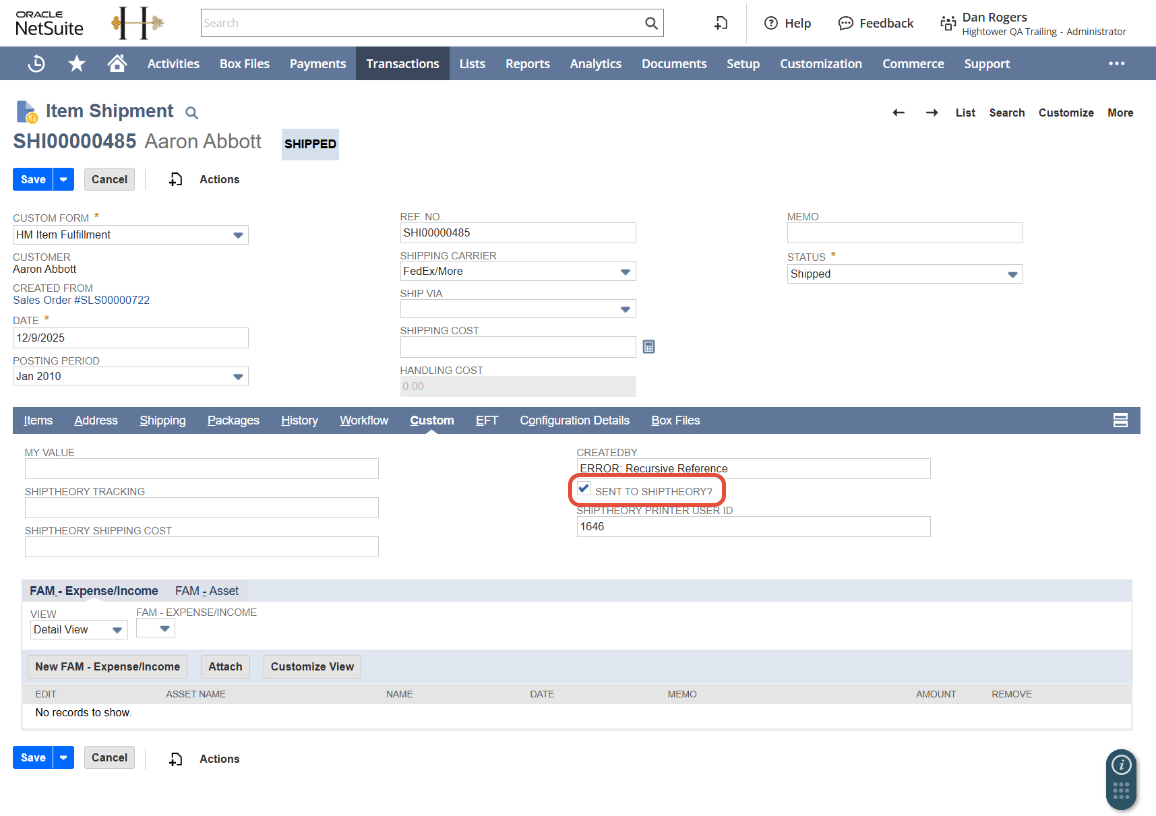
If you wish you can trigger the default functionality by unchecking the "sent_to_shiptheory" field and re-saving the Item Fulfillment. If the Item Fulfillment's status matches your configured trigger status, then it will be deployed to Shiptheory's queue.
You can find the "sent_to_shiptheory" in the Custom tab of the Item Fulfillment form.
If you encounter any issues, please feel free to contact our support team. You can call us on 0117 403 4313 (UK) / +1 (629) 666-6726 (US) or reach us online here.